
Choose the template that suits you
All of the templates below are for the same You Said It Marketplace square card artwork. Choose the format that best fits the software you use.
The easiest option if you design your cards in Canva.
An editable Illustrator template for designers working in Adobe Illustrator.
A useful reference template that can be opened or placed into compatible design software.
A simple image template you can place into software that supports PNG files.
Your upload artwork should be 154 × 156 mm. This includes the bleed required around the finished 150 × 150 mm card front.
Using the Canva template
Open the Canva template using the button above and create your design from the template rather than changing the original. It is already set up to the Marketplace artwork proportions.
Open the template
Use the Marketplace Canva template link and create your own design from it.
Add your artwork
Keep important text and focal details safely away from the trim. Any background intended to print to the edge should cover the full artwork area.
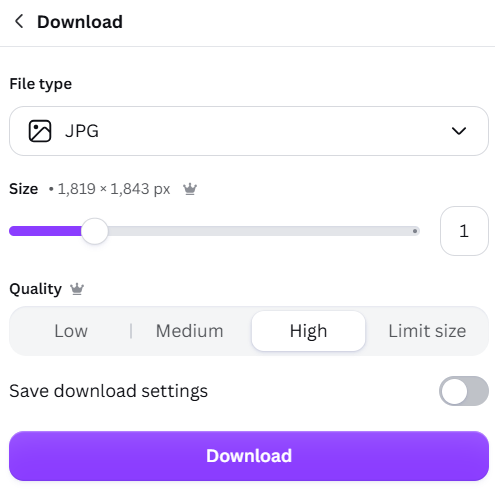
Download as JPG
When your design is finished, choose JPG and use a high-quality export.
Using the Adobe Illustrator template
Download the Illustrator template and open it in Adobe Illustrator. Build your design within the supplied artwork area, keeping the bleed and trim requirements intact.
Keep the template dimensions
Don't resize the supplied artboard. The template is designed for the Marketplace square artwork size.
Extend backgrounds into the bleed
Colours, photographs, patterns and illustrations intended to reach the card edge should extend through the bleed area.
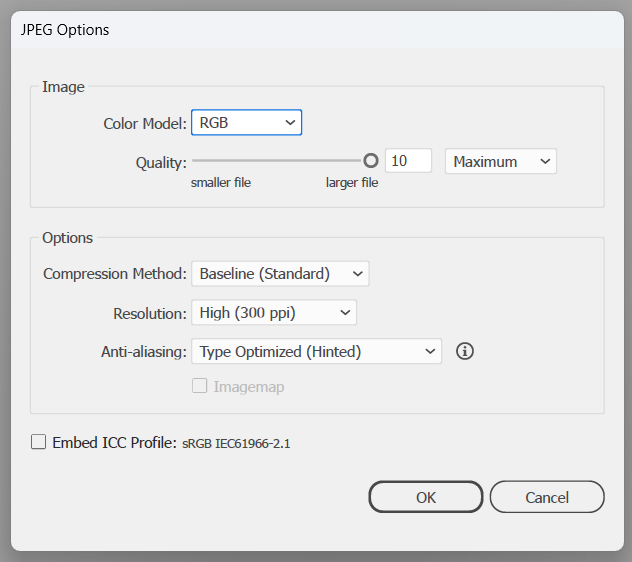
Export your final JPG
Export the finished card as a high-quality RGB JPG at 300 ppi.
Using the PDF or PNG template
The PDF and PNG versions are useful if you work in other design software or want a clear reference for the Marketplace artwork area.
Keep the original proportions so the finished artwork remains 154 × 156 mm.
Don't crop away the additional artwork around the finished 150 × 150 mm front.
If your chosen template contains guides or reference markings, make sure they are not visible in the final artwork you export.
Upload your finished artwork rather than the template itself.
Marketplace artwork requirements
Upload artwork size
Finished card front
Print-quality target
Marketplace upload formats
Allow 3 mm at the top, right and bottom and 1 mm on the left. Background artwork intended to reach the card edge should continue through this entire area.
Before you upload
Open the exact JPG or PNG you plan to upload and inspect it carefully.
Make sure photographs, illustrations and text are crisp and suitable for print.
Keep important wording, faces, logos and focal details comfortably away from the trim.
Read all wording again before submitting the design for moderation.
Template chosen? You're ready to design.
Choose the format that works best for you, create your card and then export the finished artwork for Marketplace.